
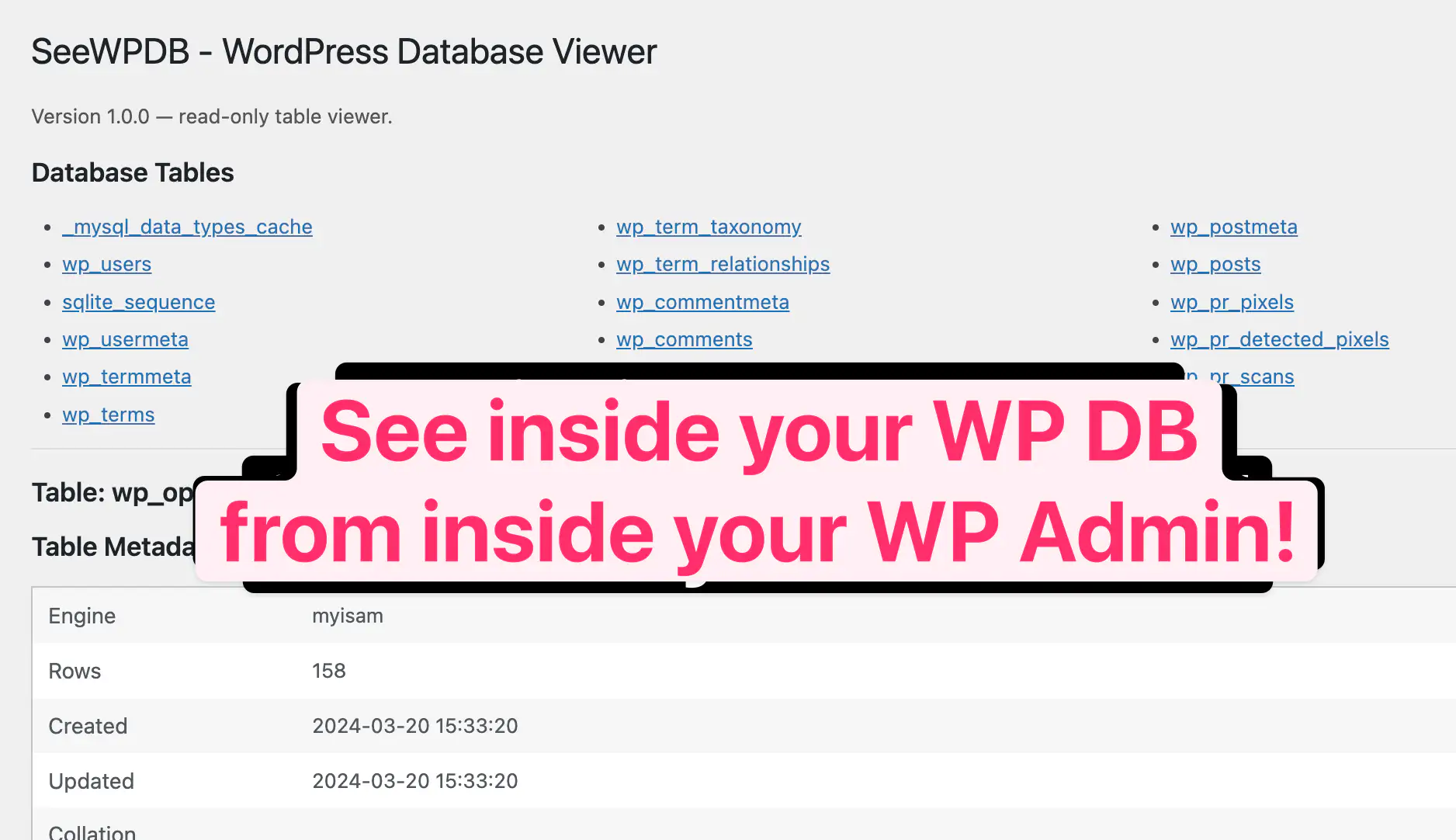
Ever wanted to know what’s actually stored in your WordPress database without cracking open phpMyAdmin? Meet your new best friend: a read-only database viewer that lives right in your WordPress admin.
Peek Inside Your WordPress Database from WP-Admin
View on…
See the code…
<?php


/**
 * Title: See WordPress Database Inside WP-Admin [SnipSnip.pro]
 * Description: A simple admin tool to view all database tables, inspect their columns, and preview a few rows of data. No editing or destructive operations — just safe, read-only access for administrators.
 * Version: 1.0.0
 * Author: Brandon Pfeiffer
 * Last Updated: 2025-11-07
 * Blog URL: https://snipsnip.pro/s/951
 * Requirements: WordPress 6.0+, Administrator role
 * License: GPL v2 or later
 *
 * Changelog:
 * 1.0.0 (2025-11-07) - Initial release with table, column, and data preview display.
 */

if (!class_exists('SeeWPDB')):

class SeeWPDB {
    const VERSION = '1.0.0';

    public function __construct() {
        add_action('admin_menu', [$this, 'register_admin_page']);
    }

    /**
     * Register the admin menu page
     */
    public function register_admin_page() {
        add_menu_page(
            __('See WP DB', 'seewpdb'),
            __('See WP DB', 'seewpdb'),
            'manage_options',
            'seewpdb',
            [$this, 'render_admin_page'],
            'dashicons-database-view',
            99
        );
    }

    /**
     * Render the admin page
     */
    public function render_admin_page() {
        global $wpdb;

        if (!current_user_can('manage_options')) {
            wp_die(__('You do not have sufficient permissions to access this page.'));
        }

        // Handle table selection
        $selected_table = isset($_GET['table']) ? sanitize_text_field($_GET['table']) : '';

        echo '<div class="wrap"><h1>SeeWPDB - WordPress Database Viewer</h1>';
        echo '<p style="color:#555;">Version ' . esc_html(self::VERSION) . ' — read-only table viewer.</p>';

        // List all tables
        echo '<h2>Database Tables</h2>';
        $tables = $wpdb->get_col('SHOW TABLES');
        if ($tables) {
            echo '<ul style="column-count:3;list-style:disc;margin-left:20px;">';
            foreach ($tables as $table) {
                $link = admin_url('admin.php?page=seewpdb&table=' . urlencode($table));
                echo '<li><a href="' . esc_url($link) . '">' . esc_html($table) . '</a></li>';
            }
            echo '</ul>';
        } else {
            echo '<p>No tables found.</p>';
        }

        // Show table info if one is selected
        if ($selected_table) {
            echo '<hr><h2>Table: ' . esc_html($selected_table) . '</h2>';

            // Show metadata if available (engine, collation, etc.)
            $table_status = $wpdb->get_row($wpdb->prepare("SHOW TABLE STATUS LIKE %s", $selected_table));
            if ($table_status) {
                echo '<h3>Table Metadata</h3>';
                echo '<table class="widefat striped"><tbody>';
                $metadata = [
                    'Engine' => $table_status->Engine,
                    'Rows' => $table_status->Rows,
                    'Created' => $table_status->Create_time,
                    'Updated' => $table_status->Update_time,
                    'Collation' => $table_status->Collation,
                    'Comment' => $table_status->Comment,
                ];
                foreach ($metadata as $key => $value) {
                    echo '<tr><th style="width:150px;">' . esc_html($key) . '</th><td>' . esc_html($value ?? '') . '</td></tr>';
                }
                echo '</tbody></table>';
            }

            // Show columns
            $columns = $wpdb->get_results("SHOW COLUMNS FROM `$selected_table`");
            if ($columns) {
                echo '<h3>Columns</h3>';
                echo '<table class="widefat striped"><thead><tr>';
                echo '<th>Field</th><th>Type</th><th>Null</th><th>Key</th><th>Default</th><th>Extra</th>';
                echo '</tr></thead><tbody>';
                foreach ($columns as $col) {
                    echo '<tr>';
                    echo '<td>' . esc_html($col->Field) . '</td>';
                    echo '<td>' . esc_html($col->Type) . '</td>';
                    echo '<td>' . esc_html($col->Null) . '</td>';
                    echo '<td>' . esc_html($col->Key) . '</td>';
                    echo '<td>' . esc_html($col->Default) . '</td>';
                    echo '<td>' . esc_html($col->Extra) . '</td>';
                    echo '</tr>';
                }
                echo '</tbody></table>';
            }

            // Show limited data rows
            echo '<h3>Sample Data (first 10 rows)</h3>';
            $rows = $wpdb->get_results("SELECT * FROM `$selected_table` LIMIT 10", ARRAY_A);
            if ($rows) {
                echo '<div style="overflow:auto;max-height:400px;"><table class="widefat striped">';
                echo '<thead><tr>';
                foreach (array_keys($rows[0]) as $col_name) {
                    echo '<th>' . esc_html($col_name) . '</th>';
                }
                echo '</tr></thead><tbody>';
                foreach ($rows as $row) {
                    echo '<tr>';
                    foreach ($row as $value) {
                        echo '<td>' . esc_html((string) $value) . '</td>';
                    }
                    echo '</tr>';
                }
                echo '</tbody></table></div>';
            } else {
                echo '<p><em>No data found or empty table.</em></p>';
            }
        }

        echo '</div>';
    }
}

endif;

if (class_exists('SeeWPDB')):
    new SeeWPDB();
endif;
See the code on github…
Leave a Reply